Copyright 2022 IEW Solutions an ifelseWare Conpany
Launch Control
When the program is started, the ‘Launch Control’ panel is modeled above the main application window.
Event Asset Folder
Establishing the event asset folder is mandatory. To make transferring event files to other storage mediums or computers easier, all assets will be automatically copied into this folder even when resourcing files from other drives and/or folders.
NOTE: Files are copied leaving the original file intact at its source. To prevent excessive use of available drive space on your system it is recommended that you manually add needed event assets directly to the event folder and prevent the system from needing to create wasteful copies.
Every new asset added needs to know what audio output to use. In most cases you will probably use the same one. This where you can choose which will be that go-to default. This does not need to be the same one setup in Windows as its default. Although, if this is the first time using Legion or if a previously assigned output no longer exists, the app will automatically revert to the Windows default.
NOTE: After an asset has been added to the playlist you can override the default assignment and select a different output for that asset without affecting others.
Use ASIO Renderer:
If you are either using assets with multi-track audio embedded, (greater than two), or simply wish to use a single multi-output device, such as a Tascam or Presonus to handle all audio outputs for the entire playlist, enable this option and the system will instead employ an ASIO (Audio Stream Input/Output) renderer to compile the output stream.
When enable the device list will now only contain a list of ASIO output device drivers currently installed on your system.
Installed with Legion is the MBSE Multichannel ASIO Renderer which is necessary to compile multiple audio streams into a single ASIO data stream. However, this is a third-party driver that requires a purchase of its own license.See: How to install or transfer the MBSE asio renderer license
NOTE: If instead of using an ASIO compatible device like a Tascam or PreSonus, you could take advantage of Blackmagic’s Decklink cards ability to have multiple audio tracks embedded into a single SDI output and de-embed them down stream. Decklink drivers include a simple WDM speaker driver which appears in the same list as the other standard stereo outputs.
If choosing this approach, you would leave the ‘Use ASIO Renderer’ option unchecked. Also, unlike using the ASIO render, this method does not provide any custom channel routing, instead assignments will just be one to one.
When enabled each individual control will produce a helpful popup describing its purpose. Due to it sometimes interfering with mouse clicks, it is recommended that this feature be disabled once you feel comfortable with all aspects of the program.
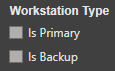
One of the program’s key features is its ability to easily connect to another workstation and use it as a backup that will mimic the primary. If you wish to setup for this scenario select the appropriate role for each of the two workstations
NOTE: As long as the link between the two are enabled all transport commands and edits performed on the primary will instantly occur on the backup as well. Also, if an asset file is added to the primary playlist but does not exist on the backup, a copy of the file will automatically be transferred to the backup for you.